
User Flow Mapping Guide
Learn how to map roles, entities, states, validation and logic branches into a user flow that guides design, development and AI implementation.
Design the software sellers learn and work in — onboarding that gets a new hire to the first call, content they find in seconds, practice before the real thing, and coaching managers can act on.

A platform sellers open between calls, not only in their first week.
The records, pipelines and owners of each customer.
Sales Enablement Platform Design
What sellers learn, find and practise to win them.
Not included
Sales training platform design starts from the seller's week, not the course catalogue: when they have time to learn, what they need mid-deal, and who reviews their work.
Ramp plans by role, with courses, milestones and what to know before the first call.

Decks, talk tracks and battlecards found in seconds, by deal stage, product or objection.
Call scenarios, objection drills and quizzes, with feedback a seller can act on.

Who is ramping, who is stuck and what to coach next, per rep and per team.
You receive
Sellers learn in the gaps of a selling day. Good sales coaching UX plans for half-finished lessons, content that goes stale and managers who review a week of practice in one sitting.
A platform sellers already trusted, redesigned for every role without breaking its voice.
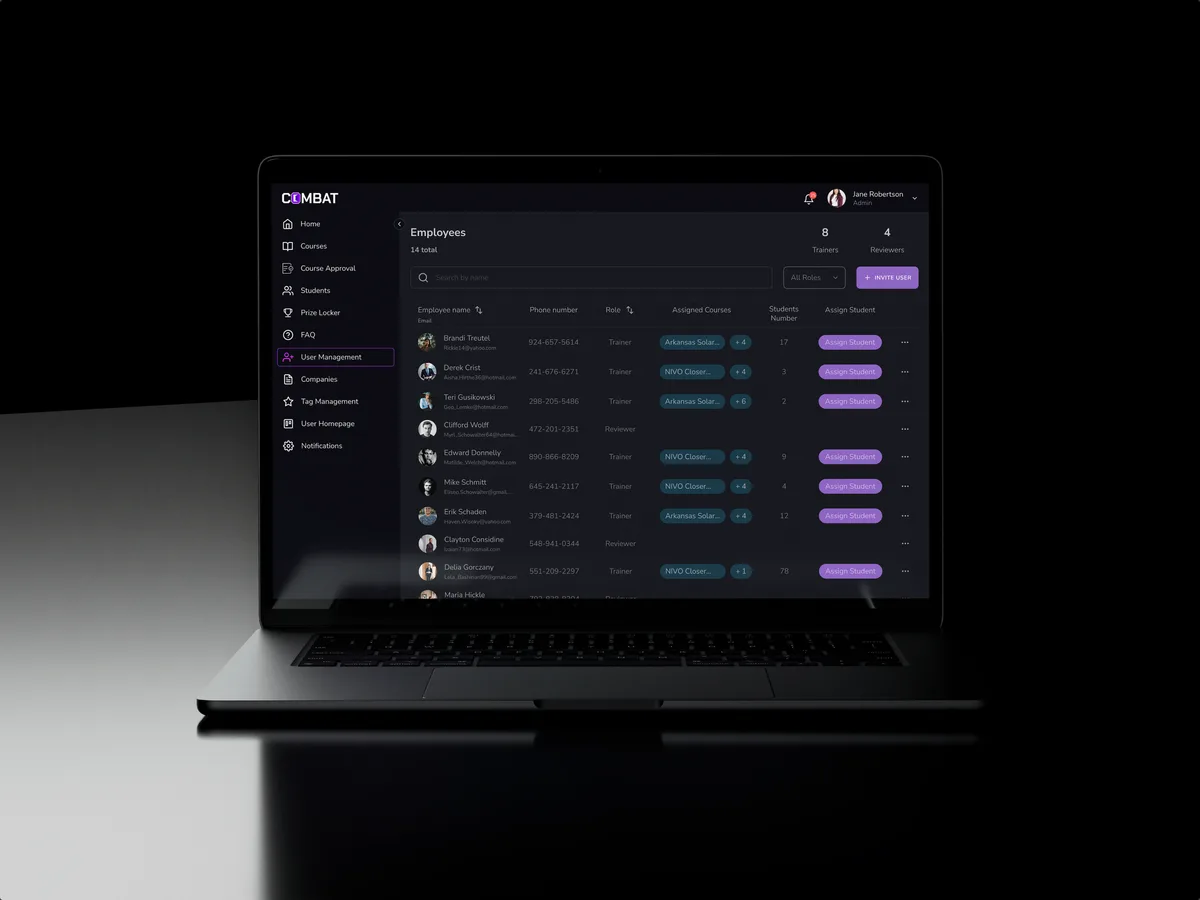
Sales training · Desktop web platform
Redesigned selected areas of a desktop sales training platform for five roles — dashboards, course approval, recorded practice and student learning — in the look its users already knew.
It fits when sellers have to learn, find and practise inside a product — and the product competes with their inbox for attention.
It takes months to sell unaided, and nobody can see where the time goes.
Decks and talk tracks live in drives and chat, in five versions.
Courses in one tool, deals in another, and practice nowhere at all.
There is no shared view of who needs help, and with what.
A different starting point

Tell us who your sellers are and where training, content and coaching fall apart. We will come back with the service that fits and a realistic next step.
We usually take an enablement platform one role or one journey at a time, under one of our services. Its proposal sets the terms.
ANODA understood how different users rely on our dashboard to follow training progress and decide what to focus on next. They helped us organise that information around each role’s priorities, making the dashboard easier to navigate and the next steps clearer. We also appreciated how carefully they worked within our existing brand guidelines, making small refinements to typography, spacing and visual hierarchy that gave the platform a more polished feel while keeping it recognisably ours.
Tell us how new sellers ramp today, where the content lives, and how managers coach.
Message received.
Within 15 minutes, we’ll email you initial feedback and follow-up questions.
Learn how to map roles, entities, states, validation and logic branches into a user flow that guides design, development and AI implementation.

Discover essential UX design strategies for SaaS to boost engagement and growth. Get expert tips from ANODA UX Agency. Contact us today for a consultation!
Look for a product design team that has worked on a training platform with several roles, not an agency that makes sales decks. Ask how it designed for the seller, the trainer and the admin, how it handled progress, calendars and content, and whether it redesigned a platform people already used. Our Combat Sales case shows that work: one platform, five roles, reworked without making anyone learn it again. Ask, too, where the software ends: we design the platform, while your enablement team or a content partner writes the courses and decks.
By following the seller's week instead of the course catalogue. Learning comes in short pieces that survive an interruption; content is found by deal stage, product or objection at the moment it is needed; practice ends in a review a manager can do in minutes; and coaching views show what each seller should work on next. Where the CRM holds the deal, the platform links to it rather than copying it, so a manager sees practice and progress next to the deals each seller is working.
New sellers who ramp, experienced sellers who look for content and sharpen skills, managers who assign, review and coach, trainers who build courses and scenarios, and admins who manage teams, content and access. The workflows are onboarding and ramp plans, courses and quizzes, content search, practice and role-play, reviews and feedback, and progress reports. Producing the decks and course content themselves is outside the design.
It depends on where the product is. Product Discovery settles what sellers need before anything is designed; a UX Audit or Usability Testing shows where the current platform loses them. UI/UX & Product Design takes a new platform to handoff, Product Redesign renews one in use, and Web App Design and Mobile App Design cover the desk and the road. CRM Development connects it to your CRM.
With the journeys, not after them. Every screen is drawn for a lesson left half-way, a new hire with nothing completed, content that is out of date, a search with no match, practice waiting for review, an overdue assignment, a seller who changes team, content limited by region or role, and a seller offline on the road. Content carries an owner and a review date, so a stale deck is flagged before a seller sends it, and permissions are set out by role, so engineering can check the build against them.
A seller, a manager and an admin login to the platform or its staging copy. Sample courses, playbooks and decks; time with new and experienced sellers and their managers; an enablement or sales lead and a product owner to make the calls; and the engineers who know the CRM and the other tools the platform connects to.
Combat Sales, a desktop sales training platform we redesigned in selected areas for five roles — 80+ final desktop screens and interaction states. The case study shows the roles, flows and screens. Wider enablement features on this page, such as content search and practice reviews, are what we design now, not claims about that project.
Yes. Combat Sales came to us with a custom platform people already used every day; we reworked selected areas in its existing look, so the changes arrived as the same product. The work sits in your files and system, with your enablement team checking each course and coaching flow before engineers pick it up.