
UI/UX Design Principles for Better Digital Products
Learn the UI and UX principles that make digital products clear, usable and resilient, with practical examples, trade-offs and a method for applying them.
ANODA traces blocked journeys and redesigns the flows, screens and states around them, so customers finish work more easily while keeping the familiar parts they rely on.

A better product, without losing what people rely on.
Tells you what is wrong and what to fix first.
Product Redesign
Makes the change and plans how it reaches users.
Not included
The existing journeys, roles, constraints and friction in the agreed area.
A proposed structure and task paths, with changes to the current experience made explicit.
Screens, components and essential states for the selected workflows.
Behaviour notes and implementation guidance for the engineering team.
The handoff identifies what changes and what should remain stable. Implementation and a full design-system rebuild are separate scopes.
A redesign changes a product people rely on today, so it begins with what they do in it now and what must not break.
The journeys, patterns and constraints of the product as it is used today.
Each key task end to end, across roles, including the steps between screens.
Connected journeys the team and, when scoped, users can walk through.
Screens, components and interaction details, consistent across the product.
Engineering handoff. Redesigned screens with the transition plan: what ships first, what changes for existing users, and what engineering needs for each step.
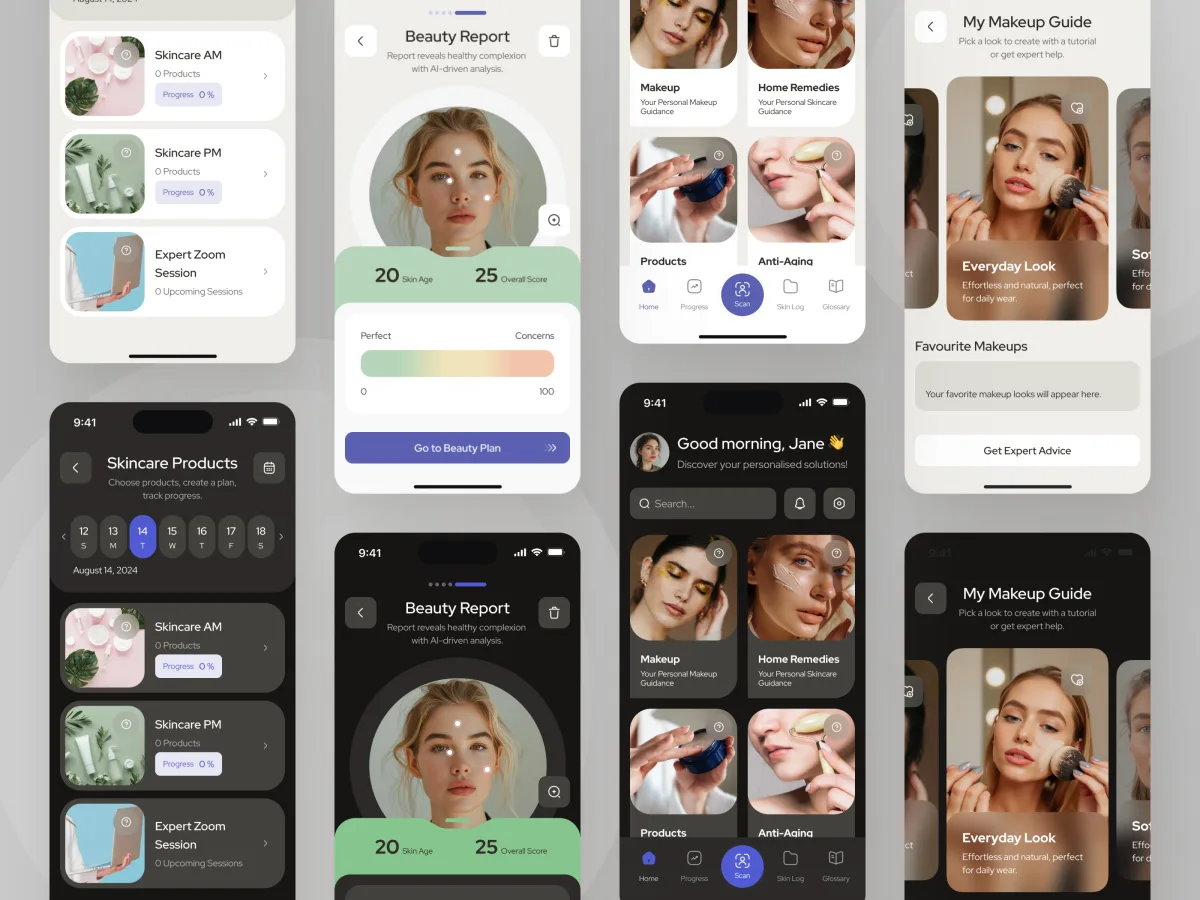
Forever Beauty shows how an audit becomes a clearer live product: reworked navigation, redesigned iOS and Android screens and light and dark UI around the existing backend, with a kit and handoff for the client’s engineers.
Beauty · Wellness · Mobile app
Audited the live app, reworked information architecture and redesigned iOS and Android interfaces around the existing backend, with a UI kit and handoff for the client team.
People already depend on its main workflows.
You can name the journey or product area to improve.
Your team can share the current system and engineering limits.
A different starting point
Show ANODA the journey users repeat, the point they struggle with and what your engineers need to preserve. We will turn that friction into a clearer product, with an explicit plan for the changes your team can deliver.
What we need from your team, who does what, and what happens after the handoff.
After the design work Implementation reviews and frontend delivery are scoped separately when needed. A design system that needs substantial work is its own scope, separate from the agreed product-design work. Usually 8–16 weeks for an agreed scope.
Our product had become outdated, and we knew it needed a substantial rethink. ANODA started with a thorough UX audit that helped us understand where users were struggling, which parts of the experience needed the most attention, and what to prioritise. They then turned those findings into a redesign that felt like a huge step forward—modern, intuitive and visually polished. We appreciated how they challenged what wasn’t working while respecting the technical constraints of the existing product. The transformation went well beyond appearance; it gave us a clearer, more cohesive product and a direction we were excited to move forward with.
Share the current workflows, user friction and engineering constraints. We will discuss the redesign scope and what needs to stay stable.
Message received.
Within 15 minutes, we’ll email you initial feedback and follow-up questions.
Optional next steps
Learn the UI and UX principles that make digital products clear, usable and resilient, with practical examples, trade-offs and a method for applying them.
Remove the barriers costing you customers. ANODA connects accessible UX, clear components and developer handoff so more people can finish the task.
Choose Product Redesign when people already depend on the software and the task is to improve its existing journeys, navigation or interfaces while respecting current constraints. Digital Product Design is a different starting point for a new product or substantial new product area. Website Redesign covers a marketing website rather than a signed-in product.
UI/UX Design covers interaction and interface design for defined software workflows. Redesign starts from a product already in use: what users do today, what needs to change, what must stay stable and how the engineering team can introduce the change. The agreed scope may cover one journey rather than the whole product.
A current-state map of the agreed area, reworked flows, redesigned interfaces and transition handoff. We connect each change to the user’s task, compare the old and new paths and use review or testing to settle the decisions that matter before engineering builds them.
We identify the workflows, terms, components, data and integration constraints users rely on, then make each change explicit. The handoff gives engineering the screens, states and continuity requirements for each step; we can plan the release in phases with your team.
The current product or a representative walkthrough, its priority workflows and roles, known friction, support feedback or research when available, and engineering constraints. A product decision-maker reviews priorities and an engineering contact checks dependencies. The access and evidence required are agreed for the selected area.
The current-state map, proposed task flows, selected screens and essential states, plus behavior notes and implementation guidance. Engineering sees what stays stable and what changes. We agree the prototype, validation and phased implementation needs before starting, so the handoff fits the work your team will build.
The journeys and user roles affected, interface states, platforms, existing-system constraints, evidence gaps and review cycles determine the effort. We agree the area, dependencies and acceptance criteria before proposing a schedule and fee. A full-product replacement is not assumed when a smaller coherent area is the agreed task.
We agree a new brand identity, full design-system rebuild, website redesign or software implementation as separate work when needed. Interface redesign works around the backend and data constraints your team maintains; research, recruitment and validation are scoped to the decisions the redesign needs to resolve.