In this article
- Choose the web product before choosing its framework
- Define task parity as a contract
- Map accounts, records and permissions
- Redesign wider workflows, rather than stretching a screen
- Respect keyboard, pointer and touch
- Make URLs and navigation useful
- Files, notifications and permissions need separate specifications
- Offline, synchronization and concurrent edits
- Share a design system without forcing identical controls
- Measure continuity and release in a controlled order
- Web-expansion readiness checklist
Expanding a native app to the web means deciding which jobs the browser should support, then adapting the workflows, data and account experience to that channel. A larger screenshot is not a web product. A person opening the same record on a laptop expects the same facts and permissions, but different controls, navigation and working space.
When customers need a browser workspace and your product offers only the phone flow, they export records, repeat work or choose a tool that fits their day. Copying mobile screens onto a wider canvas adds maintenance without removing that obstacle. ANODA connects the shared task, records and roles, then designs a web experience that uses the browser’s strengths. Your customers can continue the job across channels while your team builds from one agreed product logic.
Start with a reason that changes a user’s day: comparing many records, sharing a link, uploading documents, working on a device where installing an app is impractical, or managing a team from a desk. Downloads alone do not establish that need. Observe the task and check whether a responsive browser experience, a companion workspace or a full web application would solve it.
Choose the web product before choosing its framework
Write down the audience, the job, the present limitation and what success would look like. “Our customers want a website” could mean a public page that explains the product, a browser version of an existing task, or an administration product for a different role. Those are different scopes.
| Model | What belongs on the web | What remains native | Main risk |
|---|---|---|---|
| Full task parity | The important jobs existing users already perform | Device-specific interactions where useful | Copying every historical feature without checking demand |
| Companion | Review, export, collaboration or longer-form work | Capture, quick updates and device integrations | A broken transition between the two |
| Role-specific workspace | Managers, reviewers or support staff work on shared records | Frontline users capture and act in the field | Calling different permissions an inconsistent interface |
| Public access plus account work | Discovery and shared content before sign-in, private tasks afterward | Optional native convenience | Forcing installation before the user can see the offer |
Name the first release’s jobs and exclusions. A field app may require capture on a phone while the office needs assignment and review. The browser does not need to imitate the camera screen; it needs to explain the captured evidence and the next decision. If users only need public product information, commission a website rather than a second operational product.
Define task parity as a contract
Parity is not a count of matching screens. List each job with its actor, entry point, data, rules, completion state and handover to another role or platform. Classify it as required now, simplified on web, native-only, web-only or deferred. Resolve disagreements before the layouts make them expensive.
For an illustrative inspection product, the inspector creates a finding on a phone, the manager reviews the evidence in a browser and the inspector receives the corrective action. Shared identity and status are essential. The manager’s comparison table and the inspector’s photo annotation do not have to look identical.
Qarma is a concrete design example of that division: a mobile inspector app and a web platform connect inspection capture, reports, roles and corrective actions. ANODA designed those surfaces; development and integrations belonged to Qarma. The shared inspection record gives the inspector and reviewer their own views of the same task.
Set acceptance checks at the job level: a submitted finding appears in the right account, the responsible person can review it, an unauthorized user cannot approve it, and a later change does not silently discard the earlier evidence. Then specify the platform’s controls.
Map accounts, records and permissions
Choose a stable record identity shared across channels. Describe what happens when a user changes organization, has several accounts, loses access or opens a link sent to a different account. Signing in successfully is not enough if the browser lands in the wrong workspace.
Separate personal identity from membership and role. One person can be a member of several organizations with different rights. The interface should show the current workspace and make a switch visible; the server must enforce permissions independently of what the screen hides.
For each record, define the source of truth and the meaning of its status. “Saved,” “submitted,” “approved” and “paid” are different commitments. Document whether a status is confirmed by the service, pending synchronization or merely a local draft. The same badge must not mean different things on a phone and a desktop.
Authentication also needs browser-specific decisions: session expiration, shared computers, multiple tabs, sign-out, account recovery and return to the original deep link. Do not expose private information in URLs or assume closing a tab signs the person out. Engineering owns the security mechanism; design owns understandable states and recovery with that team.
Redesign wider workflows, rather than stretching a screen
A wider window can reveal useful context: a list beside a detail, a document beside its review, or a comparison beside a decision. Use that space only when it helps the job. Adding panels because there is room creates a denser version of the same problem.
Define what stays visible, what scrolls independently and how selection behaves when the user changes a filter. A master-detail layout needs a clear selected record and a route back to the list. Long tables need meaningful columns, sorting, search scope and a decision about pagination or virtualization with engineering.
Sail mortgage CRM shows an existing workflow redesigned for desktop and responsive mobile web: loan records, applications, pricing scenarios and documents on one UI kit. The loan officer’s job and figures remain legible as the responsive layout changes; wider views support comparison while narrow views focus the current decision.
Do not design only at a desktop width. A web application can run on a phone, a tablet, split screen or a resizable window. Specify when a secondary panel becomes a drawer, when a table becomes a focused detail view and which action remains reachable. Preserve entered values and selection during those transitions. Mobile responsive design covers the broader layout checks.
Respect keyboard, pointer and touch
Web users may arrive with a mouse, a trackpad, a touchscreen or a keyboard. Browser Pointer Events support mouse, pen and touch input; keyboard interaction still needs its own usable path. A hover interaction must also have a focus and touch route. Dragging needs an alternative for people who cannot use it, and a visual shortcut must not hide the only way to complete the task.
Write down the keyboard sequence for repeated work: opening a record, moving through fields, submitting a form, closing a dialog and returning to the previous focus. Do not intercept browser or system shortcuts without a clear reason. Test the main job without a pointer.
A web version should not inherit native edge swipes, long presses or swipe-only actions as its sole controls. Conversely, the browser’s back button is part of the experience. Decide whether Back closes a detail, returns to a filtered list or navigates away, and warn appropriately about unsaved changes.
Make URLs and navigation useful
Give important records and views meaningful routes where appropriate. A link should open the intended object after authentication, with a readable outcome if it is gone or inaccessible. Keep filter state in a shareable URL when that helps collaboration, without including sensitive search values or secrets.
Test refreshing a detail page, opening it in a new tab, copying a filtered view and returning after a session expires. Do not make the homepage the fallback for every failure. Explain whether the record was removed, the person needs access, or a temporary error prevents loading, while avoiding disclosure of private records.
Breadcrumbs, navigation labels and document titles should orient someone who entered through a link rather than through the home screen. Browser history is not a substitute for the product’s own understanding of the workflow.
Files, notifications and permissions need separate specifications
A phone camera, a desktop file picker, drag-and-drop and a browser download are different ways of handling material. List supported formats and limits, the validation point, progress, interruption, cancellation and retry. Make it clear whether a file was selected locally, uploaded or accepted into the record.
Downloads need sensible file names and an error route. Uploads need a usable fallback to dragging, and a rejected file should not wipe out the rest of the form. For large or repeated work, consider whether the user can continue elsewhere while a job processes.
Notifications need a channel decision rather than automatic parity. A native push, an in-app inbox and an email can announce the same record change, but the user should not receive duplicates merely because both products exist. Explain browser permission when the benefit is clear, preserve an in-product route when it is denied and send the tap to the actual task. Our push notification guide separates delivery from the product decisions around it.
Offline, synchronization and concurrent edits
Browser access does not guarantee a reliable network. Define what remains visible offline, what can be edited, what is stored locally and how the app warns about work that has not reached the service. Do not promise offline behavior until engineering confirms the storage and synchronization model.
A retry must not create a second payment, booking or submission. A locally queued operation needs a pending state and an eventual confirmed or failed outcome. If the user closes the window, explain whether the work continues or must be resumed.
Concurrent edits deserve an explicit rule. If a manager changed a record after the inspector opened it, silently replacing the newer value is unsafe. Show the conflict, keep the person’s draft and provide a way to compare or reload. Specify the policy with product and engineering rather than leaving it to a generic error dialog.
Share a design system without forcing identical controls
Share semantic tokens, typography rules, content terminology, status meanings and common patterns. Implement platform-specific components where behavior differs. A native navigation bar and a browser sidebar can both express the same information architecture without using the same pixels.
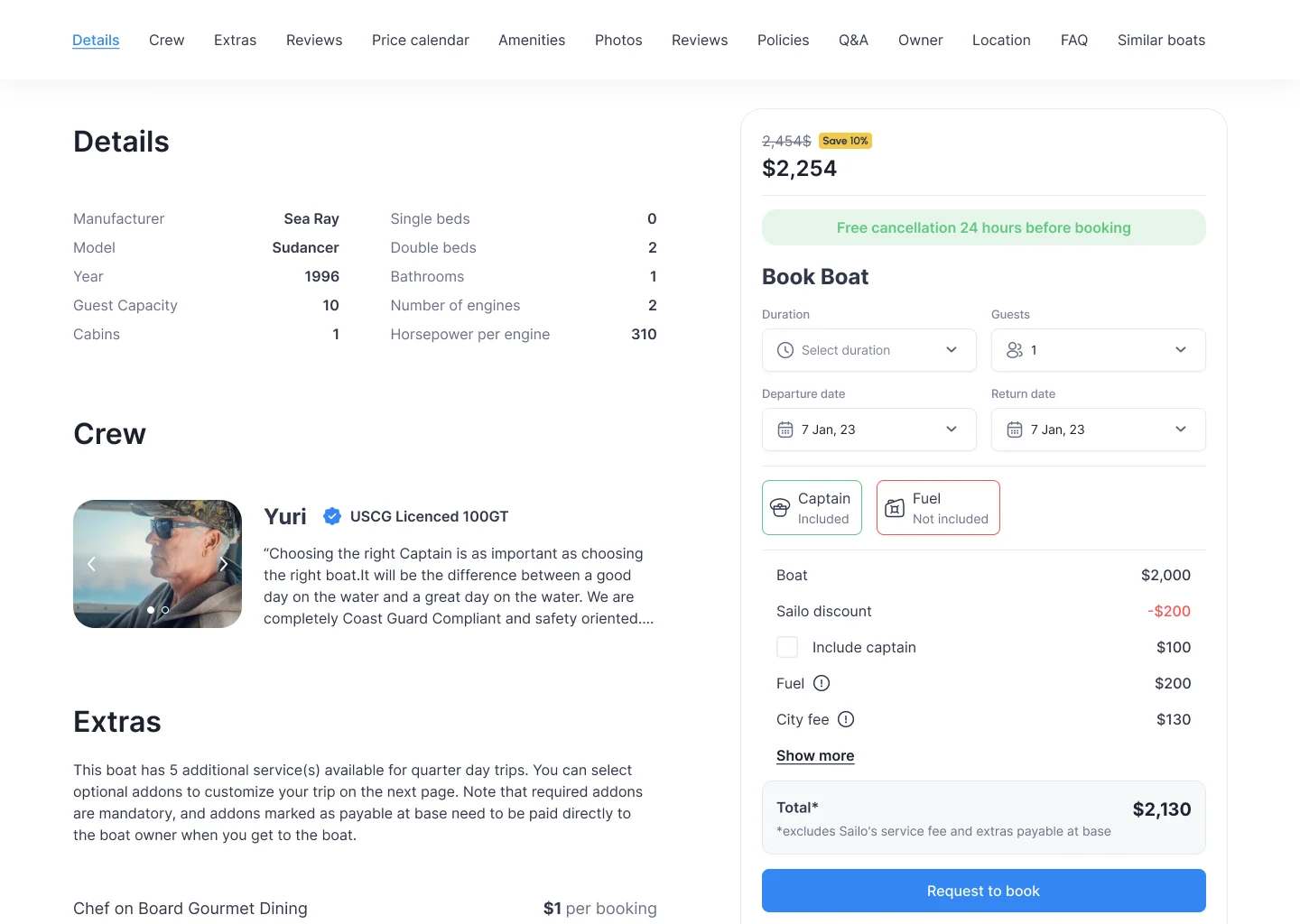
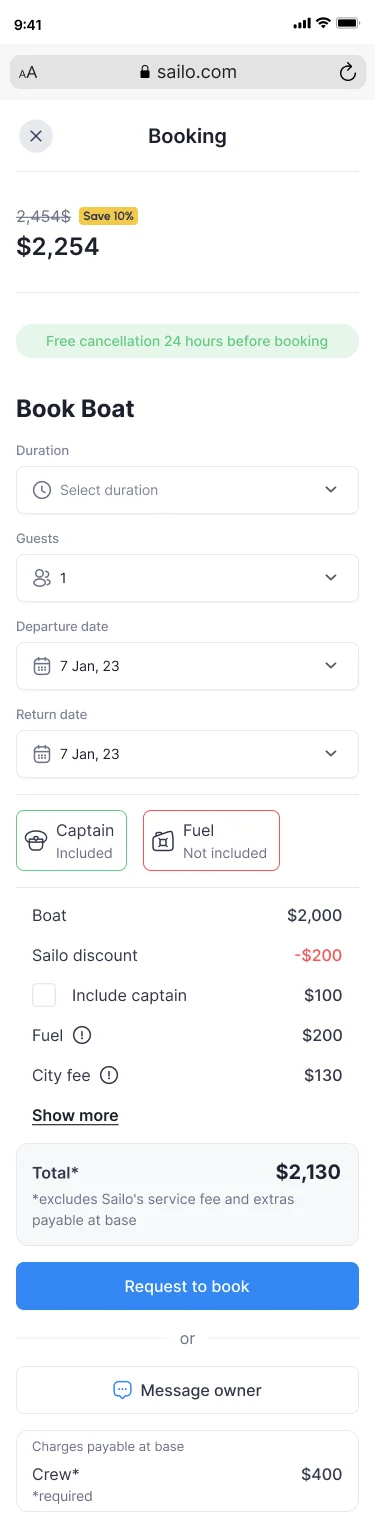
Sailo demonstrates this distinction in an iOS boat-rental app, a web booking product and a public site. Renters see charges payable now, charges due at the boat and the deposit across surfaces, while the booking card adapts to the window. Inquiry, hold, owner acceptance and paid booking remain distinct. ANODA delivered design and handoff, not the payment integrations or code.
For a system shared by both channels, design systems work should define which rules are universal and which belong to one platform. Mobile app design covers the native side; web app development covers the browser build once behavior and responsibilities are agreed.
When the designs are approved and the existing APIs support the web tasks, front end development services provide a focused interface implementation scope: components, responsive states, API integration and engineering handoff. New backend workflows belong in the broader application scope.
Measure continuity and release in a controlled order
Define common events for meaningful jobs, with a channel attribute and an appropriate account or workspace identity. Keep attempts separate from confirmed outcomes and avoid counting one job twice when it starts on a phone and finishes in the browser. Agree privacy, consent and identity handling with the responsible owners; do not copy sensitive record content into analytics.
A useful scorecard can include the share of eligible jobs completed on the web, failed transitions, time to a first meaningful result, recovery after interrupted work and support questions about missing parity. Compare equivalent cohorts and workloads. More browser sessions can mean adoption or confusion; interpret them beside completed work.
Release to a defined group first. Tell existing users what the web version does, which jobs remain native and how to use the same account. Put communication where it helps the transition rather than repeatedly pushing everyone into a channel they do not need.
Name support and engineering owners for the release, collect reproducible failures and keep a rollback route. Distinguish disabling a new web feature from reversing a database migration: old native clients may continue writing while the new channel is paused. Compatibility and rollback must be designed together.
Web-expansion readiness checklist
- The web audience and its first-release jobs are named, with explicit exclusions.
- Each shared job has a parity decision, record identity, status rule and permission rule.
- Wider and narrow windows are specified with selection and input preserved.
- Keyboard, pointer, touch, browser Back, refresh and direct links work through the main tasks.
- Uploads, downloads, offline work, retries and conflicting edits have recovery routes.
- Sessions, workspace switching and links after sign-in are covered.
- Shared components preserve meaning without overriding platform behavior.
- Analytics distinguishes channels, attempts and confirmed outcomes.
- A pilot group, communication, support owner and compatibility-aware rollback are agreed.
If these decisions are still open, start with the product and UX scope. A framework choice cannot settle them. Our Qarma and Sailo design work shows how role-specific surfaces and shared records can belong to one coherent product. Bring the native flow and the web jobs your customers need: plan your web application with ANODA and remove the handoff gaps before building another channel.
Frequently asked questions
Should a web version copy every native app feature?
No. Define required jobs, their data and rights, then choose full parity, a companion or a role-specific web workspace. Native-only and web-only tasks can remain intentional exclusions.
How should mobile workflows change on larger web screens?
Use wider space for relevant context, comparison and repeated work. Specify compact windows too, preserve selection and input, and do not add features simply because more pixels are available.
Which browser behaviors need separate design?
Direct links, refresh, Back, multiple tabs, keyboard focus, sessions, uploads, downloads and denied permissions need explicit rules and recovery paths.
Can native and web products share one design system?
Yes. Share status meanings, terminology, tokens and useful patterns, while allowing platform-specific navigation and controls. Identical pixels are not the objective.
How should accounts and analytics work across platforms?
Preserve record identity, workspace membership and permissions. Define meaningful cross-channel events without counting one completed job twice or copying sensitive content into analytics.
How should teams roll out a new web version safely?
Pilot defined jobs with a named group, explain channel differences, assign support and engineering owners, and test compatibility and rollback while existing native clients remain active.
Written by