
In short
Native, cross-platform and hybrid are implementation choices, not product strategies. One shared codebase can work very well — but iOS and Android still differ in permissions, navigation, notifications, background work and devices, and the cheapest first codebase becomes the most expensive one when those differences are ignored. List what depends on the operating system, test the riskiest integrations on real devices, and pick the architecture your team can actually maintain.
In this article
- What each development approach gives your product
- Why the stack isn’t the strategy
- One codebase, still two platforms
- The decision criteria that actually matter
- Performance, honestly
- Security, compliance and the stores
- Where each approach tends to fit
- The hidden costs nobody puts in the estimate
- What UX designers need to know about native and hybrid apps
- A practical way to decide
- An illustrative example
- When the decision points to native Android
- If you need to switch later
- Mistakes we keep seeing
- How ANODA helps
- Choose what you can maintain
Native app development means building a separate app for each platform with the platform’s own languages and tools — Swift for iOS, Kotlin for Android. Hybrid app development means building one web-based app that runs inside a native shell on both platforms. Between them sits cross-platform development with frameworks such as React Native, Flutter or Kotlin Multiplatform, which share most of the code but render real native or engine-drawn interfaces. None of them is universally better. The right choice follows from what your app needs from the operating system, how it must behave offline, how fast it must feel, which devices it must support and what your team can maintain.
Every few months someone announces that native development is dead. Every few months someone else announces that cross-platform was a mistake and they’re rewriting everything in Swift and Kotlin. Both posts get a lot of likes. Neither tells you what to do with your product.
The debate is loud because it is usually framed as a technology contest. It isn’t. Native and cross-platform are implementation choices, not product strategies. The question is not which stack wins on a benchmark, but which one gets your app’s riskiest features working on your users’ phones — and which one your team can still maintain in three years, when the people who chose it have moved on.
In our mobile product work, the expensive failures we see rarely come from choosing the “wrong” framework. They come from choosing any framework before listing what the app actually needs from the phone.
What each development approach gives your product
The terms are used loosely, and half of the confusion in this debate comes from people meaning different things by “hybrid”. Here is the practical breakdown.
Native. A separate app for each platform, written with the platform’s own tools: Swift and SwiftUI or UIKit for iOS, Kotlin and Jetpack Compose or Views for Android. Each app talks to the operating system directly. You get immediate access to every new platform feature and the most predictable behaviour — and you build, test and maintain two codebases.
Cross-platform, shared logic and optional shared UI. One shared codebase that produces real mobile apps. React Native uses JavaScript or TypeScript and renders the platform’s native interface components; since version 0.76 (October 2024), its New Architecture, which removes the old asynchronous bridge between JavaScript and native code, is enabled by default. Flutter uses Dart and draws its own interface with its own rendering engine, so it looks the same everywhere unless you make it adapt. Kotlin Multiplatform shares business logic in Kotlin and lets you keep native interfaces — or share the interface too with Compose Multiplatform, which JetBrains declared stable for iOS in May 2025.
Hybrid (web-based). A web application — HTML, CSS and JavaScript — packaged inside a native container that shows it in a web view. Frameworks such as Ionic with Capacitor, and the older Apache Cordova, provide the container and plugins to reach device features. For a web team with a suitable existing product, this can shorten the path to the app stores; plugin support, store review and the core device integrations still decide the release effort. It also has the most distance between your code and the operating system.
Progressive web app. A website that can be installed to the home screen, work offline and, with platform limits, send notifications. Browser installation does not require a store listing; on Android, a web product can also use a Trusted Web Activity as part of a packaged distribution route. Useful when the store is not essential and the feature set is modest. What a PWA can do varies by browser and platform, and support on iOS has historically lagged behind Android, so check the specific capabilities you need on your users’ devices before committing.
Most real products end up mixing these. A cross-platform app with a few native modules. A native app with one web-based screen for frequently changing content. A hybrid app with a native plugin for the camera. The labels matter less than knowing which parts of your app sit close to the operating system and which don’t.
Why the stack isn’t the strategy
A product strategy answers who the app is for, what problem it solves and why people will come back. The stack answers how the code gets onto their phones. Mixing the two leads to the classic mistake: choosing a framework first, then discovering what the product needs.
A familiar example: a team picks a hybrid framework because it promises “one codebase, two platforms, half the cost”. Six months later they learn that the product’s core feature — background location tracking for field workers, say, or reliable Bluetooth pairing with a device, or offline data sync across a shift without signal — depends on precisely the parts of iOS and Android that behave differently and that the web view can’t reach without native plugins. The plugins exist, but one is unmaintained, another doesn’t support the latest OS version, and the third behaves differently on two Android manufacturers. The “half the cost” is now spent on the gap.
It works the other way too. A team builds two fully native apps for what is essentially a content catalogue with a login and a cart, then spends every sprint implementing each feature twice while the competition ships weekly.
The framework was not the mistake in either case. Skipping the list of requirements was.
One codebase, still two platforms
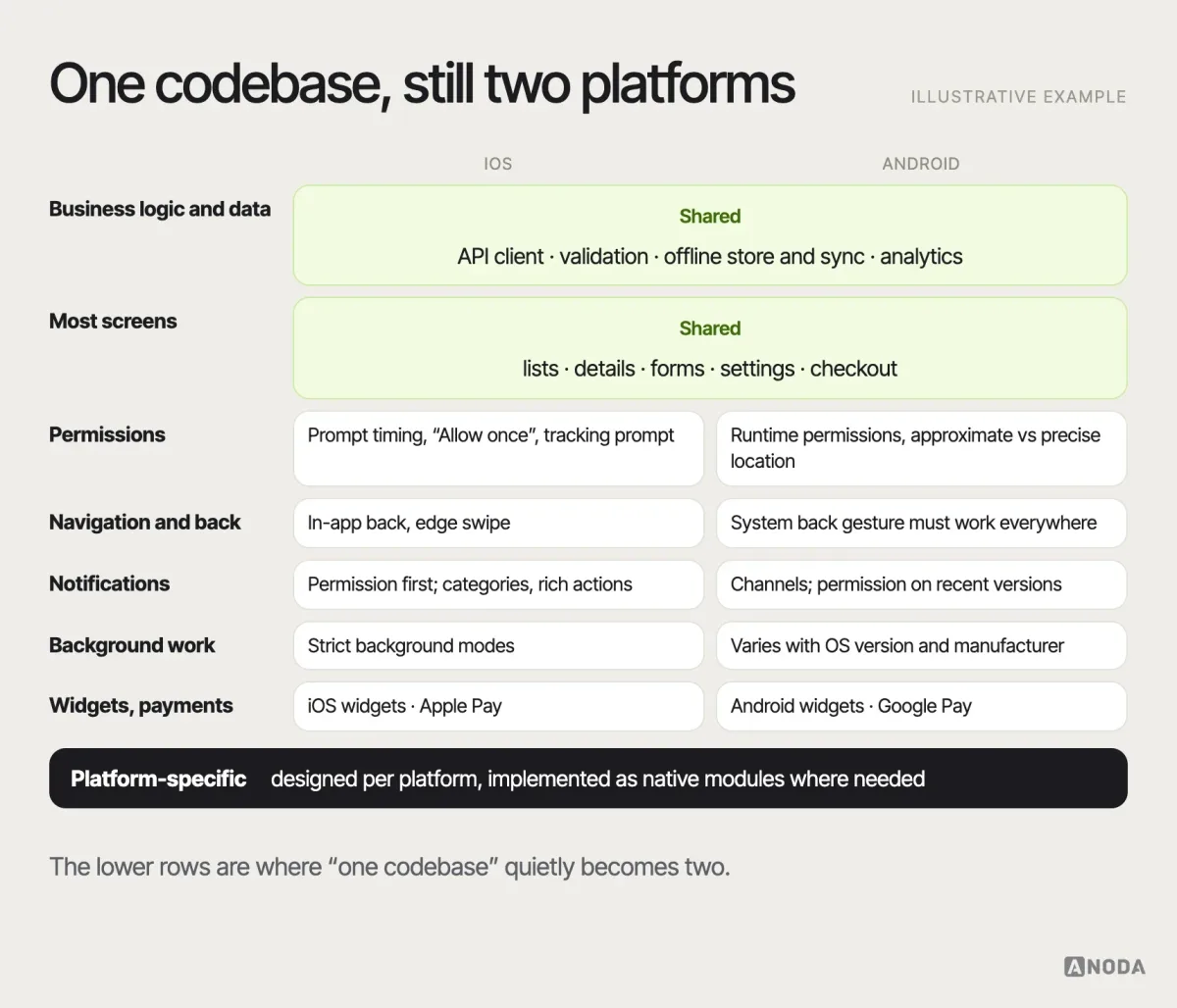
The most common misunderstanding about cross-platform development is that a shared codebase means a shared product. It doesn’t. Even when 90% of the code is shared, iOS and Android remain different environments with different rules, and users on each expect their platform’s behaviour.
The differences that matter most:
- Permissions. When and how an app may ask for location, notifications, camera, contacts or tracking; what happens after a refusal; which permissions come in levels, such as approximate versus precise location or “while using” versus “always”. The same feature can need different flows on each platform.
- Navigation and back behaviour. Android has a system back gesture that users expect to work everywhere; iOS relies on in-app navigation and edge swipes. A navigation model designed only for one feels broken on the other.
- Notifications. Different permission models, channels and categories, delivery rules and rich notification capabilities.
- Background execution. What the app may do when it is not on screen — sync, location, audio, downloads — is tightly and differently restricted on each platform, and restrictions change with OS releases.
- System integrations. Widgets, share sheets, payments, health data, wallets, shortcuts, voice assistants, deep links and App Clips each have platform-specific APIs and rules.
- Device fragmentation. iOS runs on a limited set of Apple devices. Android runs on thousands of models from many manufacturers, with different screen sizes, performance levels and, occasionally, manufacturer-specific behaviour around battery optimisation and background work.
- Accessibility. VoiceOver and TalkBack behave differently, and so do dynamic text sizes and system settings.
- Store review. Apple’s App Store Review Guidelines say an app should include “features, content, and UI that elevate it beyond a repackaged website” (guideline 4.2). A thin wrapper around your website is a review risk, not a shortcut.
None of this rules out a shared codebase. It means the shared codebase needs a plan for platform-specific behaviour — in design as much as in code.
The decision criteria that actually matter
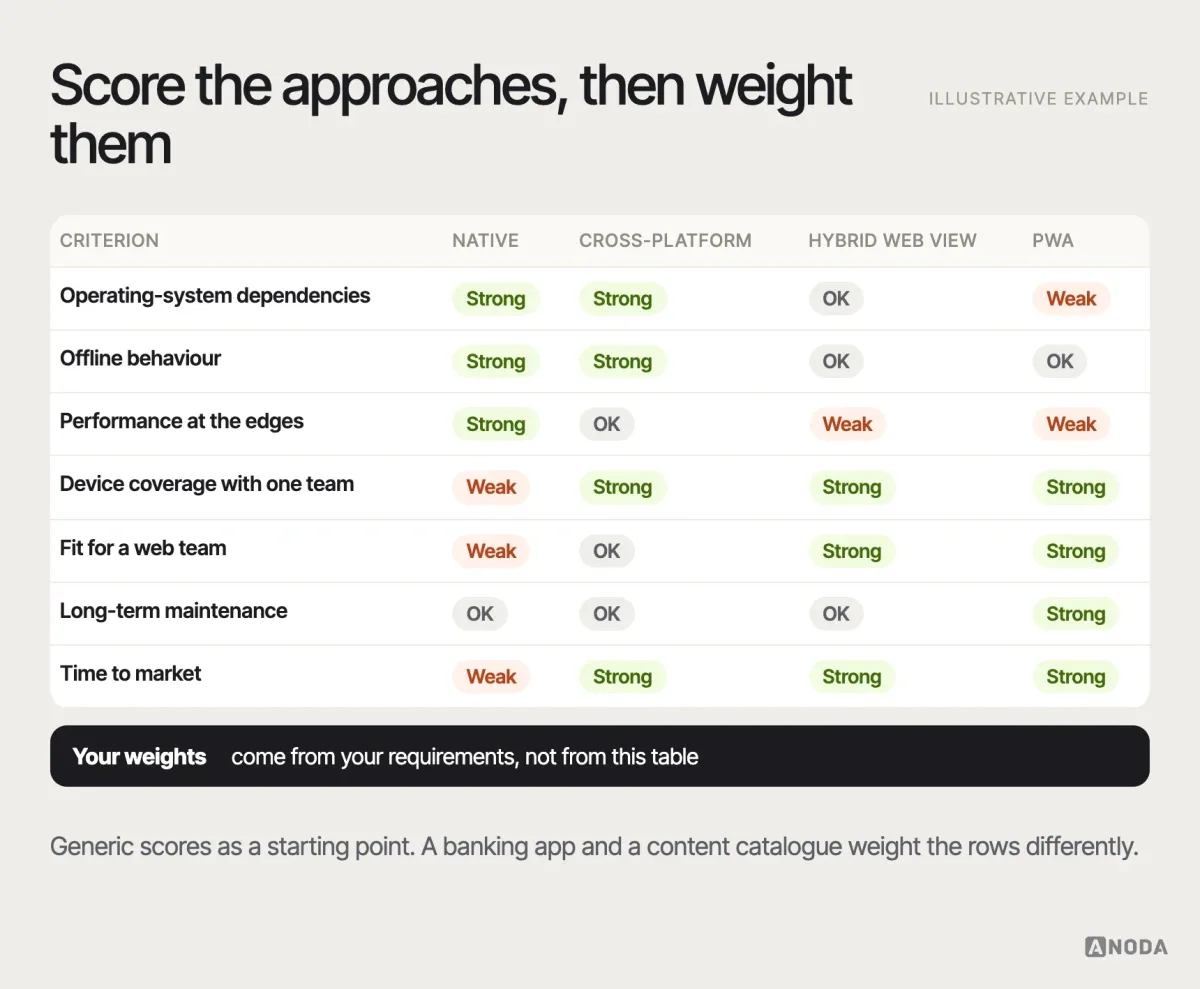
Here is the list we use as a recommendation when a client asks which approach to take. It is ordered by how often each criterion decides the outcome.
1. Operating-system dependencies. List every feature that touches the OS: camera and scanning, Bluetooth, NFC, background location, health data, payments, widgets, push notifications, biometrics, file system, calls, audio in the background. The more of the product’s core value sits in this list, the more a native or native-rendered approach pays off, and the riskier a web-view hybrid becomes. On Clearwater Wellness, the app doesn’t just display data — it drives a physical cold-plunge unit, so temperature, timing and safety states had to be reliable enough that someone standing in freezing water can trust exactly what the screen says. Requirements like that belong at the top of the list, before anyone argues about frameworks.
2. Offline behaviour. “Works offline” can mean anything from caching the last screen to a full local database that syncs and resolves conflicts. Serious offline work — field service, logistics, healthcare in basements, travel — needs careful data architecture on any stack, but it is harder to do reliably inside a web view.
3. Performance and interaction quality. Long lists with images, complex gestures, animations, maps, real-time data, camera processing. Modern cross-platform frameworks handle most of these well; web views handle fewer of them gracefully, especially on low-end Android devices. For graphics-heavy or latency-critical apps, native still has the edge.
4. Device coverage. Who are your users and what do they carry? A B2B tool for employees with company-issued iPhones is a different problem from a consumer app for a market where most people use budget Android phones.
5. Team capability. The best stack is the one your team can build, debug and maintain. A strong web team can ship a good hybrid app faster than it can learn Swift and Kotlin. A native team forced into a framework it doesn’t know will ship slower, not faster. Hiring is part of this: consider who you can find and keep.
6. Maintenance cost over time. Initial build cost is the number everyone compares. The number that matters is the cost of every OS release, framework upgrade, plugin update and device you’ll have to support for the life of the product. Shared codebases reduce duplicated feature work; they add framework upgrades and dependency risk. Separate native interfaces require platform-specific delivery and testing; teams can still share backend services, requirements and, where appropriate, business logic.
7. Time to market and existing assets. An existing web app, design system or React codebase can shorten the path considerably. So can a native team that already maintains one of the two platforms.
Performance, honestly
Performance is where the debate gets most tribal, so it helps to be specific. For most screens in most business apps — lists, forms, detail pages, settings — users can’t tell a well-built cross-platform app from a native one. The differences show up at the edges: very long lists with heavy images, complex gestures and transitions, maps with many markers, real-time charts, camera processing, and startup time on low-end devices.
Web-view hybrids feel the edges earliest. Scrolling, keyboard handling, gestures and transitions are where a web page inside an app most often gives itself away, especially on budget Android phones. Cross-platform frameworks close most of that gap, with occasional costs in app size, startup time or the effort needed to optimise a demanding screen. Native gives you the most direct control — and the most responsibility, because a badly built native app is still a slow app.
The practical rule: don’t argue about performance in general. Identify the two or three screens where it matters most in your product and measure them on the devices your users carry.
Security, compliance and the stores
Banking, health and insurance products need a security scope tied to the data and the product’s obligations. Secure storage, biometric authentication, screenshot handling, device-integrity checks or certificate pinning may belong in that scope; they are not a universal checklist required for every app. Agree the threat model and partner requirements before choosing implementation measures. All of these are achievable on native and cross-platform stacks, usually through platform APIs or well-maintained libraries. In a web-view hybrid, some of them need native plugins, and the web layer adds its own attack surface to review.
Treat these as requirements on the same list as Bluetooth or background sync: name them, check how each candidate stack meets them, and spike the uncertain ones.
Where each approach tends to fit
As recommendations rather than rules:
Native tends to fit when the product’s value depends on the operating system — health and fitness tracking, hardware companions over Bluetooth, camera- and AR-heavy apps, audio, navigation, apps that must feel instant on every interaction — or when you need new platform features on the day they launch. It also fits when you already have strong teams on both platforms.
Cross-platform native-rendered tends to fit most business and consumer apps: marketplaces, banking and fintech front ends, booking, delivery, productivity, internal tools. The shared codebase covers the bulk of the screens, and native modules handle the few platform-specific features. It is often the pragmatic default today — provided the platform-specific behaviour is designed and not left to chance.
Hybrid web-view tends to fit when the app is mostly content and forms, the team is a web team, the web product already exists and the OS integrations are light: internal portals, event apps, simple customer accounts, prototypes that need to reach the stores quickly. It fits less well as the core product of a company that competes on mobile experience.
A progressive web app tends to fit when app-store presence isn’t essential, installs are a nice-to-have and the feature set stays within what the browser supports on your users’ devices.
The hidden costs nobody puts in the estimate
The comparison tables in most articles show build cost and performance. The costs that actually decide whether a choice was good arrive later:
- Plugins and native modules. Device integrations may use framework APIs, maintained libraries or custom native modules. Identify the dependencies your core flows actually need. Some are maintained by the framework, some by volunteers. When one stops being updated, you own it.
- Upgrades. OS releases every year, framework releases more often, and breaking changes in between. A cross-platform app has to keep up with both platforms and the framework. Skipping upgrades is how apps end up stuck on old versions that no longer pass store requirements.
- Two sets of platform work anyway. Store listings, signing, review processes, crash reporting, platform-specific bugs and device testing exist for every approach.
- Designing twice without knowing it. When platform-specific behaviour isn’t designed up front, developers make those decisions one by one during implementation, and the product ends up inconsistent in ways nobody chose.
- Rewrites. The most expensive cost of all: the product outgrows the approach, and the team rebuilds. Sometimes that’s the right call — a fast hybrid first version that proves demand can be worth rebuilding later. It should be a plan, not a surprise.
The cheapest initial codebase becomes expensive when the platform-specific flows are ignored. That is the whole debate in one sentence.
What UX designers need to know about native and hybrid apps
Designers are often told the stack is an engineering decision and handed a single set of screens to “make work on both”. That is how products end up with iOS-style navigation on Android, custom controls that fight the platform, and permission prompts that appear at random moments.
A few things designers should know, whichever approach the team takes:
- Know both platforms’ conventions. Apple’s Human Interface Guidelines and Google’s Material Design describe how navigation, controls, typography, gestures and system dialogs behave. Users of each platform have learned those behaviours. Follow them where they matter — navigation, back, system prompts, sharing — and keep your brand in content, colour and tone rather than in reinvented controls.
- Design the platform-specific flows explicitly. Permissions, notifications, onboarding into system features, payments, widgets. These are rarely identical, and they’re where the experience is won or lost.
- Design states the stack will expose. Offline, slow network, background sync, interrupted uploads, denied permissions, OS-level settings the user changed. Hybrid and cross-platform apps surface these just as native apps do.
- Respect system settings. Dynamic text size, dark mode, reduced motion, screen readers. A shared interface has to adapt to each platform’s settings, not freeze one version for everyone.
- Ask what’s shared and what isn’t. A design system for a cross-platform app should document which components behave identically and which adapt per platform, so developers don’t decide it screen by screen.
- Test on real devices. A simulator on a fast laptop hides exactly the problems — performance, keyboard behaviour, gestures, permissions — that differ most between approaches.
Designers should also be in the room when the stack is chosen. They are usually the first to know which flows are platform-specific, which states the product depends on and which interactions will be hardest to build — exactly the information the decision needs. This is where design decisions and stack decisions meet. A design that ignores the platforms makes any stack expensive; a design that plans for them makes a shared codebase realistic.
A practical way to decide
We recommend running the decision as a short, structured piece of work rather than a debate:
- List the capabilities that depend on the operating system. Every feature, marked by how deeply it relies on the platform, and whether it’s core to the product or peripheral.
- Rank the risks. Which of those capabilities, if it doesn’t work well, breaks the product? Those are your deciding features.
- Spike the riskiest integrations on real devices. Build the hardest two or three features — background sync, Bluetooth pairing, the camera flow — in the candidate approach, and run them on the devices your users carry, including older and budget ones. A few days of spikes are cheaper than months of discovery.
- Check the team and the hiring market. Who will build it, who will maintain it, and who can you hire if they leave?
- Estimate the life of the product, not the first release. Include upgrades, plugins, device testing and the platform-specific design work.
- Decide what’s shared and what’s platform-specific. In the architecture and in the design, before the first sprint.
- Write the decision down. The reasons, the risks you accepted and the signals that would make you revisit it. Future you will want to know why.
The outcome is often less dramatic than the debate suggests: a shared codebase for most of the app, native modules for a few features, and an explicit design for the flows where the platforms differ.
Mobile app development
Native, cross-platform or hybrid?
We define what your app needs from each platform, test the riskiest integrations on real devices and plan the architecture your team can maintain — so the first release works on the devices your customers use.
An illustrative example
Here is how the process plays out in an illustrative example, not a specific client. A company wants an app for its field technicians: job lists, customer details, photos of completed work, signatures, and a checklist for each visit. The office team suggests wrapping the existing web portal, because it already has all the screens.
The capability list changes the conversation. Technicians work in basements and rural areas with no signal for hours, so the app needs real offline storage and sync, not a cached page. Photos must be taken, compressed and queued for upload in the background. Several customers require a signature captured on the device. Many technicians use older Android phones issued years ago.
The team spikes the two riskiest features — offline sync with conflict handling and background photo upload — in a cross-platform framework, on the actual devices from the field. Both work, with native modules for background upload. The decision: a cross-platform app, shared interface for the job screens, platform-specific handling for permissions, background work and notifications, and a design for every offline and sync state. The web portal stays for the office. The wrapper idea would have shipped faster and failed on the first day in a basement.
When the decision points to native Android
If the agreed requirements put Android first, Android app development turns the decision into a Kotlin build, a device test list, permission flows and a Google Play release plan. If both platforms belong in the same release, compare that scope with Flutter development and React Native development. Agree the platform requirements, technical prototype and delivery responsibilities before the first sprint.
If you need to switch later
Sometimes the first choice stops fitting: the product grows into features the approach handles badly, or the team changes. Switching is expensive, but it doesn’t have to be a big-bang rewrite. Common paths are adding native modules to a cross-platform app for the demanding features, moving screens one by one from a web view to native or cross-platform code, or sharing business logic first and interfaces later. The sooner the platform-specific parts are isolated, the cheaper any of these becomes.
Mistakes we keep seeing
- Choosing the stack before listing the requirements. The framework is picked in a kick-off meeting; the requirements arrive later and don’t fit.
- Treating “one codebase” as “one design”. Platform conventions ignored until users on one platform complain.
- Believing the demo. A framework’s showcase app is not your app. Your riskiest integration is.
- Testing only on flagship phones. The office has the latest iPhones; the users have three-year-old Android phones with low storage.
- Wrapping the website and calling it an app. Store rejection risk, poor offline behaviour and an experience that feels like what it is.
- Choosing native “for quality” without the team to do it twice. Two half-staffed native apps drift apart and fall behind each other.
- Ignoring the maintenance bill. Upgrades postponed until the app stops building.
- Deciding forever. An approach that fits the first version may not fit the fifth. Write down what would trigger a rethink.
How ANODA helps
We don’t sell a stack. We start from the product: the users, the tasks, the devices, the operating-system capabilities the product depends on and the team that will maintain it. From there we define the platform requirements, design the shared and platform-specific behaviour — permissions, navigation, notifications, offline and error states — and support the implementation planning, including spikes on the riskiest integrations. Sometimes the answer is native, often it is cross-platform with a few native parts, occasionally it is a hybrid first version with a plan for what comes next.
If you’re weighing the options for a new app or reconsidering an existing one, our mobile app development team can help you make the decision with evidence rather than opinions. More guides on product, design and development live on the ANODA blog.

Mobile app development
Deciding how to build your app?
Bring the feature list and the constraints. We’ll help you turn them into a platform plan, a shared-versus-native map and a first release your team can maintain.
Choose what you can maintain
Native, cross-platform and hybrid all ship good apps, and all of them have shipped expensive failures. The difference is rarely the framework. It’s whether the team knew what the app needed from the phone, tested the hard parts early and planned for the platform differences a shared codebase doesn’t erase. List the capabilities that depend on the operating system, test the riskiest integrations on real devices, and choose the architecture your team can maintain.
Choose native iOS when the core journey benefits from Apple-specific interfaces or integrations and your first audience is already on those devices. Our iOS app development service takes that decision through Swift implementation, real-device checks and TestFlight builds, with the first useful journey visible before the release expands.
Frequently asked questions
What is the difference between native and hybrid app development?
Native development builds a separate app for each platform with its own languages and tools, such as Swift for iOS and Kotlin for Android. Hybrid development builds one web-based app that runs inside a native shell on both platforms. Cross-platform frameworks such as React Native, Flutter and Kotlin Multiplatform sit between them: one shared codebase that renders native or engine-drawn interfaces.
Is cross-platform the same as hybrid?
Not quite. Hybrid usually means a web app shown in a web view inside a native container, for example with Ionic and Capacitor. Cross-platform frameworks such as React Native and Flutter share code across platforms but render native components or draw their own interface, which gives them closer access to the operating system and usually better performance.
When should you choose native app development?
As a recommendation: when the product's core value depends on the operating system — background location, Bluetooth hardware, health data, camera or AR, audio, widgets — when interaction speed is critical, or when you need new platform features on launch day and have the team to build and maintain two apps.
Is a hybrid app cheaper?
Often at the start, especially for a web team with an existing web product. Over the life of the product, the cost depends on plugins, framework and OS upgrades, device testing and how much of the app needs platform-specific behaviour. The cheapest first codebase becomes expensive when platform-specific flows are ignored.
What do UX designers need to know to design native and hybrid apps?
Both platforms' conventions for navigation, back behaviour, controls and system prompts; which flows differ per platform, such as permissions, notifications and payments; the offline, sync and error states the app must handle; system settings like text size and dark mode; and how the design system separates shared components from platform-specific ones.
Written by